


AI Software · AI Automation
Automate the busywork, keep the judgment.
 Reviewed by Adam Segall, Founder & CEOUpdated
We find the workflows worth automating, decide where a person must still check the work, and build it on your tools or in code you own.
01Overview
What an AI automation agency actually does
An AI automation agency should do three things a software subscription cannot: pick the right workflows, design where people stay in control, and keep the system running after launch. Plain automation moves data when a rule fires. AI automation adds judgment steps: reading a messy email, sorting a lead, drafting a reply, pulling fields from a PDF. The skill is knowing which steps need AI and which need a simple rule.
Unified has built this for our own clients first. Inside UnifiedIQ, a website form becomes a tagged contact in the client's GoHighLevel CRM, answers in the right fields, within seconds; in an October 2026 test it took about three seconds. Spam and job seekers are filtered out, the owner gets an email within minutes, and every Monday a test lead checks each form still works. That is the standard we bring to your workflows.
Automation vs AI automation, in one line each
- Rule-based automation: "When a form is submitted, create a contact and send email 1." Fast, cheap to run, predictable. Our intelligent workflows service handles this layer.
- AI automation: "Read the message, decide if it is a sales lead, a support issue or spam, draft the right reply, and route it." Handles messy input, needs guardrails.
- Agents: "Work through the whole task across several systems until it is done." Most powerful, most supervision. See AI agents.
At a glance. AI automation = a trigger, a set of rule-based steps, one or more AI steps (classify, extract, summarize, draft), a human checkpoint where errors are costly, and logging. If any of those five is missing, the system will either be fragile or unsafe.
02What first
Which workflows to automate first
Our rule as an AI automation agency: automate the job that happens most often, costs you money when it is late, and is easy for a person to check. That usually means follow-up and data entry, not strategy. The workflows that look impressive in a demo, like an AI that runs your whole sales process, are almost never the right first project.
| Workflow | What the automation does | What a person still does | Payoff | Effort |
|---|---|---|---|---|
| New lead follow-up | Logs the lead, tags the source, sends a first reply, starts a follow-up sequence that stops on reply | Calls hot leads, handles questions | High: speed to lead | Low |
| Missed-call text-back | Texts a caller back when a call is missed | Returns the call | High | Low |
| Intake and document processing | Reads forms, PDFs and photos into CRM fields | Spot-checks extracted fields | High for paperwork-heavy businesses | Medium |
| Call and meeting notes | Summarizes calls and drafts notes into the CRM | Approves notes | Medium | Low |
| Review requests | Sends an opt-in review request when a job is marked won | Replies to reviews | Medium | Low |
| Weekly reporting | Pulls numbers from each tool into one summary | Reads it, decides | Medium | Medium |
| Autonomous outbound sales | Writes and sends cold outreach on its own | Cleans up the damage | Low and risky | High |

Speed is why lead follow-up tops the list. A reply that lands while the customer is still on their phone beats a perfect reply sent tomorrow. For the follow-up sequences themselves, the rules matter: our cadences stop the moment a lead replies, books or opts out, and respect quiet hours. Marketing email also has to follow the FTC's CAN-SPAM compliance guide, which requires a clear opt-out that is honored within 10 business days.
The five-question test before we automate anything
- Does it happen at least weekly?
- Can someone describe the steps, including the exceptions?
- Is the input mostly digital (forms, email, PDFs), not paper and memory?
- Can a person check the output in under a minute?
- If it fails silently for a day, do we notice and is the damage small?
Five yeses means build it now. Three or four means fix the process first. Two or fewer means leave it with a person. For the step-by-step mapping method, read our guide to AI workflow automation, and for paperwork-heavy jobs, AI document processing covers extraction in depth.
03Why Unified
Why teams pick Unified as their AI automation agency.
We run these systems for our own clients every day, so we design for the day things break.
We run it ourselves first
Our UnifiedIQ platform moves leads from website forms into client CRMs within seconds, sorts spam, texts back missed calls and runs follow-up that stops on reply. We automate your work with patterns we already depend on in production.
People stay in charge
Every AI step gets an autonomy level based on what a mistake costs. Anything a customer sees waits for a person until the logs prove the system is reliable, and even then a human owns every message sent under your name.
Tool-neutral, code-capable
We build in your CRM, in connector tools like Zapier, Make or n8n, or in custom code, depending on what the workflow needs. We do not force every problem into one platform because it is the only one we know.
Built to be owned
Automations, accounts, prompts and code live in your name with documentation. If you hire your own developer later, they can pick it up. Nothing depends on a login only our team holds.
04Human in the loop
Human in the loop: how much should the AI decide?
Every AI step gets an autonomy level, chosen by what a mistake would cost. We set it per step, not per system, so the low-risk parts run on their own and the risky parts wait for a person. Starting lower and raising the level once the logs show the AI is reliable is far safer than the reverse.
| Level | What the AI does | Good for | Not for |
|---|---|---|---|
| 1. Suggest | Drafts or recommends, a person decides and acts | Customer replies, quotes, anything regulated | High-volume, low-stakes sorting |
| 2. Approve to act | Prepares the action, a person clicks approve | Outbound emails, CRM changes, public review replies | Real-time conversations |
| 3. Act and log | Acts on its own, every action logged and reviewed later | Tagging, routing, internal summaries, data entry | Anything a customer sees |
| 4. Fully autonomous | Acts with no routine review | Very narrow, well-tested tasks | Almost everything in a small business |
The security community has a name for giving AI too much power: the OWASP Top 10 for LLM Applications lists "excessive agency" next to prompt injection and sensitive information disclosure. Our builds give each AI step only the permissions it needs, never a master key to your CRM. We also borrow the govern, map, measure and manage structure of the NIST AI Risk Management Framework to decide who owns each risk.
In practice this looks like our live call assistant, in pilot at a South Florida wellness practice: during a call it suggests responses from a playbook the practice approved, and drafts call notes afterward. A person runs every call. Insurance questions get "we'll verify your benefits," never a promise of coverage. That is level 1 by design, because the stakes are a patient's trust.
Our standing rule, inside UnifiedIQ and in every client build: nothing goes out under a client's name without a person approving it. Automation handles the work around the message. A human owns the message.
05Tools vs custom
Off-the-shelf tools vs a custom build
Most businesses should start with the automation features in software they already pay for, then add a connector tool, and only build custom when the workflow is core to how they make money. An AI automation agency that only knows one tool will push every problem into it. We work across all three layers and choose by how the work actually runs.
| Option | Examples | Best when | Trade-offs |
|---|---|---|---|
| CRM-native automation | GoHighLevel workflows, HubSpot workflows | Most steps live in the CRM already | Limited AI steps, tied to that vendor |
| Connector platforms | Zapier, Make, n8n | Several SaaS tools need to pass data | Task-based billing at volume, logic gets tangled, fragile when an app changes |
| Custom code | Your own app, API integrations, AI services | The workflow is core, high-volume or needs your own data and rules | More upfront work, needs an owner and maintenance |
Custom is right more often than vendors admit once a workflow becomes the business. HuntReserve is a good example: guided-hunt outfitters needed bookings, nine drag-and-drop pipeline stages, digital waivers and reminders working as one system, so we built a custom CRM and booking platform and paper waivers went to zero. Read more on that layer in custom AI tools and our custom CRM builds.
Other builds sit on the customer side. HonestyInsure.com has a 24/7 AI agent chat in its hero, and the Center for Spiritual Living runs 732 migrated events on a custom AI-assisted events platform. Whatever we build runs in your accounts with your data, and the documentation is yours.
06Running it
Launching and running AI automation without surprises
Automations fail quietly, and an AI automation agency that ships without monitoring leaves you exposed. A form field gets renamed, an API key expires, an app changes its output, and leads stop flowing with no error anyone sees. So every build we ship includes monitoring: test transactions on a schedule, alerts when volume drops to zero, and a log of every AI decision someone can audit. UnifiedIQ runs a nightly watchdog for exactly this reason.
What we measure
- Time to first response on new leads, before and after.
- Hours returned per week, estimated by the people who used to do the task.
- Error and override rate: how often a person changes the AI's draft. Falling numbers mean the system is learning your standards.
- Leads and revenue by source, using call tracking and form attribution so automation does not hide where customers came from.
Questions to ask any AI automation agency
- Which steps in this workflow use AI, and which are plain rules?
- Where are the human checkpoints, and who staffs them?
- What happens when an app in the chain changes or goes down?
- Who owns the accounts, automations and code if we part ways?
- What will it cost us in maintenance time after launch?
Red flags: an agency that promises to automate your whole business, cannot show you the logs, builds everything inside its own account, or measures success in workflows shipped instead of hours saved and leads booked. If you are not sure where to start, our AI consulting services produce a scored list first. Start with AI agents for small business for background, browse the AI software practice, or contact us with the workflow that hurts most.
07How we work
How an AI automation project runs.
One workflow at a time, measured before and after.
- Step 01
Map the workflow
Like any AI automation agency worth hiring, we sit with the people who do the job and map every step, input, exception and hand-off. We time the current process so there is a real before number, and we run the five-question test on each step.
- Step 02
Design the checkpoints
Each step gets a rule or an AI action and an autonomy level. We decide where a person approves, what gets logged, what alerts fire, and what happens when an upstream app changes or fails.
- Step 03
Build and test
We build on your CRM, a connector platform or custom code, then run real past examples through it. Your team reviews outputs side by side with what they would have done until the error rate is acceptable.
- Step 04
Launch and monitor
We switch on with a small group, watch the logs and override rates, and raise autonomy only where the data supports it. Scheduled test transactions and drop alerts keep the system honest after launch.
08What you get
What you get.
- 01
Workflow map
Every step of the process documented, with timings, exceptions and which steps are rules, AI actions or human decisions.
- 02
Autonomy plan
The suggest, approve, act-and-log or autonomous level for each AI step, with the reasoning and the evidence needed to raise it.
- 03
The working automation
Built in your CRM, a connector tool or custom code, connected to the systems your team already uses every day.
- 04
Monitoring and alerts
Scheduled test runs, volume-drop alerts and a log of every AI decision, so silent failures get caught the same day.
- 05
Before and after numbers
Response time, hours returned and override rate measured against the baseline we took during mapping.
- 06
Handoff documentation
How it works, how to change it, and who to call, written so your team or a future developer can own it.
09Results
Proof, not promises.
Verified results from live client builds: rankings, AI citations and tracked inquiries, not projections.
-
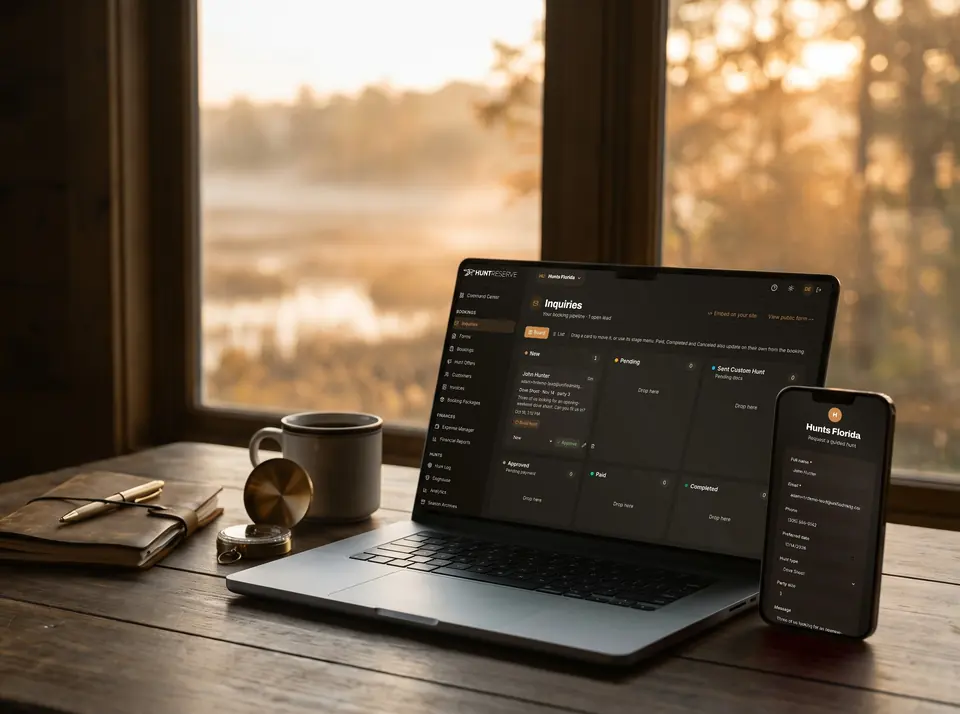 SaaS · Booking & Operations PlatformHuntReserve
From a stranger's inquiry to a paid, waivered, licensed hunting party without a single phone call.
9pipeline stages, drag-and-drop1personal link per hunter: details, license, waiver
Read the case study
SaaS · Booking & Operations PlatformHuntReserve
From a stranger's inquiry to a paid, waivered, licensed hunting party without a single phone call.
9pipeline stages, drag-and-drop1personal link per hunter: details, license, waiver
Read the case study -
 Insurance · AI Search Site + Live ChatHonestyInsure.com
A health insurance site written to be the answer AI search gives, with an AI agent that enrolls you right on the page.
144pages and guides indexed31states with their own local pages
Read the case study
Insurance · AI Search Site + Live ChatHonestyInsure.com
A health insurance site written to be the answer AI search gives, with an AI agent that enrolls you right on the page.
144pages and guides indexed31states with their own local pages
Read the case study -
 Community · Website + Custom Events PlatformCenter for Spiritual Living
A rescued website and a custom events platform that runs the center's entire calendar.
753pages live732events migrated to the new platform
Read the case study
Community · Website + Custom Events PlatformCenter for Spiritual Living
A rescued website and a custom events platform that runs the center's entire calendar.
753pages live732events migrated to the new platform
Read the case study
10Questions
AI automation questions, answered.
What does an AI automation agency do?
An AI automation agency finds the workflows worth automating, decides which steps need AI and which need simple rules, designs human checkpoints, builds the system on your tools or in custom code, and monitors it after launch. Unified does all of that with one in-house team that also runs marketing and CRM work.
Which business processes should we automate first?
Start with frequent jobs that cost money when they are slow and are easy to check: lead follow-up, missed-call text-back, intake paperwork, call notes and review requests. Leave strategy, pricing and sensitive conversations with people, and automate the work around them instead.
Is AI automation safe for customer-facing messages?
It can be, with the right autonomy level. We start customer-facing steps at suggest or approve-to-send, so a person reviews every message. Autonomy only increases when logs show the drafts rarely need changes, and some steps should never run unattended.
Should we use Zapier or Make, or build custom?
Use the automation already in your CRM first, a connector platform when several apps need to pass data, and custom code when the workflow is core to how you make money or runs at high volume. Many of our builds mix all three.
What happens when an automation breaks?
Our builds include scheduled test transactions, alerts when volume drops to zero and a log of every AI decision. When an upstream app changes, the alert fires and we fix it, rather than someone discovering weeks later that leads stopped flowing.
Will we own the automations you build?
Yes. As an AI automation agency we build everything in accounts you own, with documentation covering how it works and how to change it. If you bring development in house or work with someone else later, nothing is locked behind our logins.
How is this different from your AI consulting work?
Our AI consulting work decides what to automate and why, and ends in a scored plan. Automation work builds and runs the system. Many clients start with consulting, then hand the top-scoring workflow to the same team to build.
Pairs well with.
- Intelligent WorkflowsRule-based automation between your tools
- AI AgentsMulti-step work with guardrails
- Custom AI ToolsAssistants on your own data
- AI Consulting ServicesScore your use cases first
- Email Marketing ServicesFollow-up that respects the rules
- HuntReserve case studyCustom CRM and booking platform
One team. Every channel.
Websites, search, ads, content, CRM and AI software built by one in-house team, so every piece works with the others.
Automate the job that hurts most.
Send us the workflow your team dreads and we will map it, score it and show you what should run on its own. Call (954) 758-7200 or send a note.